什么是Style,什么是Theme?
- 1.1 联系
Style 和 theme:是一个包含一种 或者 多种格式化 属性 的集合 ,并且 style和theme都是资源,存放在res/values 文件夹下
- 1.2 区别:
style:View级别的,只能在某个Activity的布局文件中使用
Theme:应用级别的,你必须在AndroidManifest.xml中 的
在定义Theme的时候@符号和?符号有何区别?
@符号 表明 我们引用的资源是前边定义过的(或者在前一个项目中或者在Android 框架中)。问号?表明 我们引用的资源的值在 当前的 主题当中定义过
怎么通过代码给一个Activity设置主题?
1 | protected void onCreate(Bundle savedInstanceState) { |
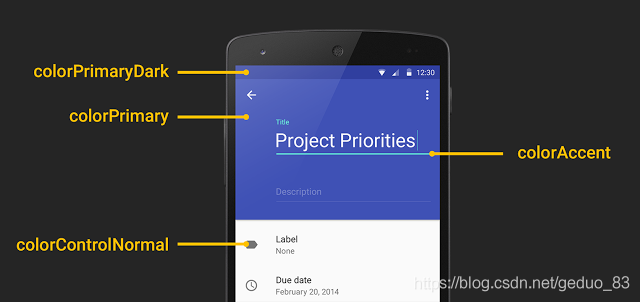
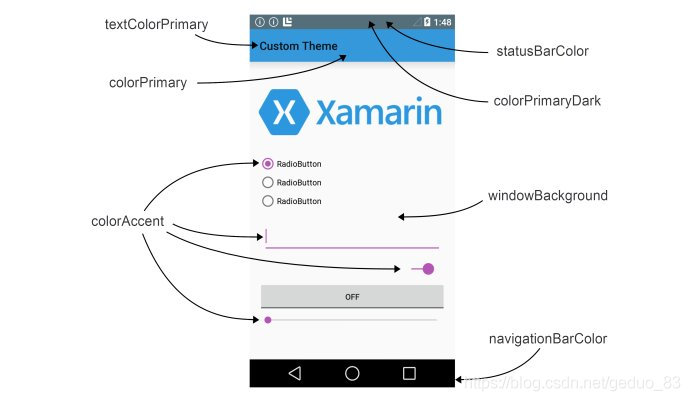
AppTheme主题颜色colorPrimary,colorPrimaryDark,colorAccent都是什么的颜色?
- 4.1 colorPrimary
App Bar 的背景色,即 ActionBar,通常也是一个 App 的主题色调。不过 ActionBar 已经退出历史舞台,由 Toolbar 代替使用,但是 Toolbar 需要在 layout 文件中单独使用 background 属性设置背景色,如:
- 4.2 colorPrimaryDark
status bar(状态栏)背景色。仅作用于 Lollipop 及更高版本。
- 4.3 colorAccent
许多控件在选中状态或获取焦点状态下使用这个颜色,常见有:
- CheckBox:checked 状态
- RadioButton:checked 状态
- SwitchCompat:checked 状态
- EditText:获取焦点时的 underline 和 cursor 颜色
- TextInputLayout:悬浮 label 字体颜色
等等
- 4.4 android:navigationBarColor
navigation bar 背景色。仅作用于 Lollipop 及更高版本。
- 4.5 colorControlNormal
某些 Views “normal” 状态下的颜色,常见如:unselected CheckBox 和 RadioButton,失去焦点时的 EditText,Toolbar 溢出按钮颜色,等等。
- 4.6 colorControlActivated
某种程度上,是 colorAccent 的替代者,比如对于 CheckBox 和 RadioButton 的 checked 状态,colorControlActivated 属性会覆盖 colorAccent 属性的对应颜色。
- 4.7 colorControlHighlight
所有可点击 Views 触摸状态下的 Ripple(涟漪)效果。仅作用于 Lollipop 及更高版本。
- 4.8 colorButtonNormal
Button normal 状态下的背景色。注意,这种设置与 Button 的 android:background 属性改变背景色不同的是,前者在 Lollipop 及更高版本上会让 Button 依旧保持阴影和 Ripple 触摸效果。
- 4.9 android:windowBackground
窗口背景色,诸如此类的还有:android:background,android:colorBackground 等。
- 4.10 android:textColorPrimary
EditText 的 text color,等等文本颜色。
- 4.11 navigationIcon
返回按钮的图片
常见的主题风格都有哪些?
android:theme=”@android:style/Theme.Dialog” 将一个Activity显示为能话框模式
android:theme=”@android:style/Theme.NoTitleBar” 不显示应用程序标题栏
android:theme=”@android:style/Theme.NoTitleBar.Fullscreen” 不显示应用程序标题栏,并全屏
android:theme=”Theme.Light” 背景为白色
android:theme=”Theme.Light.NoTitleBar” 白色背景并无标题栏
android:theme=”Theme.Light.NoTitleBar.Fullscreen” 白色背景,无标题栏,全屏
android:theme=”Theme.Black” 背景黑色
android:theme=”Theme.Black.NoTitleBar” 黑色背景并无标题栏
android:theme=”Theme.Black.NoTitleBar.Fullscreen” 黑色背景,无标题栏,全屏
android:theme=”Theme.Wallpaper” 用系统桌面为应用程序背景
android:theme=”Theme.Wallpaper.NoTitleBar” 用系统桌面为应用程序背景,且无标题栏
android:theme=”Theme.Wallpaper.NoTitleBar.Fullscreen” 用系统桌面为应用程序背景,无标题栏,全屏
android:theme=”Translucent” 半透明
android:theme=”Theme.Translucent.NoTitleBar” 半透明、无标题栏
android:theme=”Theme.Translucent.NoTitleBar.Fullscreen” 半透明、无标题栏、全屏
android:theme=”Theme.Panel”
android:theme=”Theme.Light.Panel”